
communication
” பிள்ளையார் சுழி…” !!!

எதை எழுத ஆரம்பித்தாலும் முதலிலே பிள்ளையார் சுழி போட்டுவிட்டுத்தான் ஆரம்பிக்கிறோம். பெரிய காவியமாகத்தான் இருக்கவேணும் என்றில்லை; ஒரு போஸ்ட் கார்டானாலும் ஸரி, கடை ஸாமான் லிஸ்டானாலும் ஸரி, முதலில் பிள்ளையார் சுழி போட்டு விட்டுத்தான் எழுத ஆரம்பிக்கிறோம். எழுதுவது மட்டுமில்லாமல் எந்தக் காரியமானாலும் ஆரம்பிக்கிற போது அது விக்நமில்லாமல் பூர்த்தியாவதற்கு மஹாகணபதியைக் கொண்டு வந்துதான் ஆகணும். அவரைக் ஸ்மரிக்காமல் எந்தக் காரியமுமே இல்லையானாலும், இந்த எழுத்துக் காரியத்தில் அவரை ஸ்மரிக்கிறோம் என்பது Written proof -ஆகவே (எழுத்து மூல நிரூபணமாகவே) பிள்ளையார் சுழியில் தெரிகிறது.
பின்னாடி நாம் எழுதுகிற விஷயம் ‘சுழித்து’ப் போகாமலிருப்பதற்காக முன்னாடி பிள்ளையார் சுழி போட்டு விடுகிறோம்.
பிள்ளையார் சுழி போடாமல் ‘ஓம்’போடுகிறவர்களும் கிரந்தம், தமிழ் இரண்டிலுமே அந்த ஓமுக்கும் சுழித்தே ஆரம்பிக்க வேண்டியிருக்கிறது. அதுமட்டுமில்லை, இந்த ப்ரணவ ஸ்வரூபமும் பிள்ளையார்தானே?
சுழி என்பது வளைசல்; ‘வக்ரம்’ என்பார்கள். பிள்ளையாரின் தும்பிக்கை நுனி வளைந்து சுருட்டிக் கொண்டிருக்கிறது. அதனால் ‘வக்ரதுண்டர்’என்றே அவருக்கு ஒரு பேர். பிள்ளையார் சுழி போடுவதில் பாதியாக இருக்கிற வளைசல் பூர்ணமாகிவிட்டால் முழு வட்டம். பூலோகமும், பல லோகங்களும், நக்ஷத்ர மண்டலங்கள் அடங்கியுள்ள பிரம்மாண்டமும் எல்லாமே வட்டமானவைதான். ‘அண்டம்’என்றாலே முட்டை என்றுதான் அர்த்தம். முட்டை வட்ட வடிவந்தானே?
இந்தப் பூர்ணரூபத்தையே ஸைஃபருக்கும் சொல்வதுதான் ஆச்சரியம்! ‘பரீ¬க்ஷயில் கோழி முட்டை’என்கிறோம். ‘பூர்ணமும் பிள்ளையார்தான், சூன்யமும் பிள்ளையார்தான். உள்ளது அல்லது எல்லாம் பரமாத்மாதான்’என்கிற மஹா தத்துவத்தையே சுழி காட்டுகிறது. காரியத்தை ஸஃபைர் பண்ணிக்கொண்டு வருகிறவனை, ”என்னடா சுழி!”என்று ப்ரக்ருதத்திலும் (நடைமுறையிலும்) சொல்கிறோம். கையிலிருக்கிற மோதகத்தில் தித்திப்புப் பூர்ணத்தை வைத்துக்கொண்டு தன்னுடைய பூர்ணத்வத்தை ‘டெமான்ஸ்ட்ரேட்’பண்ணும் பிள்ளையாருக்கே சுழி போடுகிறோம். இந்தச் சுழி மற்றச் சுழியையெல்லாம் முழுசாகப் பண்ணிவிடுவது.
வளைசலான கொம்போடு ஆரம்பிக்கிற பிள்ளையார் சுழி, கொஞ்சம்கூட வளையாத நேர்கோட்டோடு முடிகிறது. பிள்ளையார் பூர்ணம், சூன்யம் இரண்மாக ஆனாற்போலவே வக்ரமானதும் அவர்தான், ஆர்ஜவமானதும் (நேரானதும்) அவர்தான் என்பது தாத்பரியம். வக்ர குணத்துக்கு நேரெதிரானதை ஆர்ஜவம் என்பார்கள். தமிழில் இதைத்தான் நேர்மை என்பது. இங்கிலீஷிலும் straightness, straight- forward என்கிறார்கள். குணம் குணஹீனம் எல்லாம் ஒரே நிர்குண பரமாத்மாவின் வேஷங்கள்தான்.
‘உ’என்பது ப்ரணவத்தின் இரண்டாவதான நடு அக்ஷரம். அ-உ-ம என்ற மூன்றும் சேர்ந்தே ‘ஓம்’காரமான ப்ரணவம். விஷயம் தெரிந்தவர்கள் இதை இங்கிலீஷில் Om என்று எழுதாமல் Aum என்றே எழுதுவார்கள். ‘அ’என்பது ஸ்ருஷ்டி;பிரம்மா. உ என்பது பரிபாலனம்; விஷ்ணு. ம ஸம்ஹாரம்;ஈஸ்வரன். த்ரிமூர்த்திகளும் தோன்றியது ஏக பராசக்தியால்தான். அதனால் அவள் ப்ரணவ ஸ்வரூபிணி. ஆனாலும் ஓமை தேவீ ப்ரணவம் என்று சொல்வதில்லை. ‘உமா’ என்பதே தேவீ ப்ரணவம் என்பார்கள். அ-உ-ம என்ற சப்தங்களே மாறி ‘உமா’ வில் உ-ம-அ எனற இருக்கின்றன அல்லவா?ஓமில் ஸ்ருஷ்டி பீஜமான ‘அ’ முதல் எழத்தாயிருக்க, ‘உமா’ விலோ ஸ்திதி (பரிபாலன) பீஜமான ‘உ’என்பது முதல் எழுத்தாயிருப்பதால்தான், அன்போடு ரக்ஷித்து, காத்து, பரிபாலனம் பண்ணும் அம்பாளின் ப்ரணவம் ‘உ’ வில்தான் ஆரம்பிக்க வேண்டுமென்று காரணம் சொல்லி, இதனாலேயே ‘உமா’என்பதை அம்பாளுடைய ப்ரணவமாகக் கூறுகிறார்கள்.
அ-உ-மவில் ஹ்ருதயம் மாதிரி நடுவேயிருப்பது ‘உ’அதுவே கருணாமயமாகக் காப்பாற்றுகிற தேவீ ப்ரணவத்தில் ப்ரதம ஸ்தானத்திலிருக்கிறது. ப்ரணவ ஸ்வரூபப் பிள்ளையார் ‘அ’வும் ‘ம’வும் சேராமல் இந்த ‘உ’காரமாக மட்டுமே பிள்ளையார் சுழியில் இருப்பதைப் பார்க்கும்போது ஒன்று தோன்றுகிறது. அதாவது அவர் ”தாயைப் போலப் பிள்ளை”மட்டுமில்லை;தாயாருக்கும் ஒரு படி மேலே என்று தோன்றுகிறது. எப்படி?அவளும் ரக்ஷிக்கிற ‘உ’வுக்குப் பின்னாடியாவது ஸம்ஹார ‘ம’ஸ்ருஷ்டி ‘அ’ இவற்றையும் வைத்தக் கொண்டிருக்கிறாள். ஆனால் பிள்ளையோ எப்போது பார்த்தாலும் எல்லாரையும் ரக்ஷிப்பது தவிர வேறு ஜோலியே வைத்துக்கொள்ளாத பூர்ண கருணாமூர்த்தியாக இருந்துகொண்டு ‘உ’ ஒன்றோடேயே நின்றுவிடுகிறார்.
ப்ரணவத்தில் ‘உ’ விஷ்ணுவின் ரூபம். உமாவும் விஷ்ணு ரூபிணியாக, நாராயண ஸஹோதரியாக, ‘விஷ்ணு மாயா விலாஸினி’யாக, ‘நாராயணி’ என்றே பெயர் படைத்தவளாயிருக்கிறாள். பிள்ளையாரைப்பற்றி ஸகலரும், ஸகல கார்ய ஆரம்பத்திலும் சொல்லும் ஸ்லோகத்திலும் ”சுக்லாம்பரதரம் விஷ்ணும்” என்றே வருகிறது. (இங்கே விஷ்ணு என்றால் ஸர்வ வியாபகமானவர் என்று அர்த்தம்) ‘உ’ என்பது சிவ-சக்தி புத்ரனை விஷ்ணுவோடும் ஸம்பந்தப்படுத்தி, சைவ வைஷ்ணவத்தை ஸமரஸம் பண்ணி விடுகிறது!
வளைசலும் நேர்கோடுமாக இருக்கிற பிள்ளையார் சுழியில் நிறையத் தத்வார்த்தம் இருக்கிறது. சக்ராகாரமாக எந்த ஒன்று சுற்றினாலும் அதற்கு மத்தியில் அதற்கு ஆதாரமாக, அச்சாக ( axis- ஆக) நேரான ( straight- ஆன) ஒன்று இருந்தாக வேண்டும். விஷ்ணு தன் விரலையே நேராக நிமிர்த்திக்கொண்டு அதிலேதான் சக்ராயுதத்தைக் கோத்துக் கொண்டு சுற்றுகிறதாகவே விக்ரஹங்களில் காட்டியிருக்கும். சுற்றச் சுற்றப் பொறிப் பொறியாகக் கொட்டுகிற கார்த்திகை வாணமானாலும் ஸரி (இது ஒளி) – விரலிலே மாட்டிக்கொண்டு சுற்றிச் சுற்றி டபடபவென்று அடிக்கிற கிரிச்சட்டியானாலும் ஸரி (இது ஒலி) – இதுகளின் வட்டமான சுழற்சிகளுக்கு ஆதாரமாகக் கையோ, குச்சியோ எதுவோ ஒன்று நேர்கோடாக இருக்க வேண்டியிருக்கிறது. யுனிவர்ஸில் லோகங்களெல்லாம் ஸர்குலராகத்தான் சுற்றிக்கொண்டிருக்கின்றன என்கிறபோது இவற்றுக்கும்கூட straight line-ஆக ஒரு ஆதார axis நம் கண்ணுக்குத் தெரியாவிட்டாலும் energy (சக்தி) ரூபத்தில் இருக்கத்தான் வேண்டும். வட்டமாகச் சுற்றுகிற ஸகலப் பிரபஞ்சத்தையும் அதற்கு ஆதார சக்தியான கோட்டையும் சேர்த்துத்தான் பிள்ளையார் சுழியில் வட்டமாகவும் நேர்கோட்டு பாகமாகவும் போடுகிறோம்.
எங்கேயோ படித்த, அல்லது கேட்ட, ஞாபகம், எனர்ஜி உண்டாகிறதே பிள்ளையார் சுழி ரூபத்தில்தான் என்று. தாரை கொட்டி அதிலிருந்து எலெக்ட்ரிஸிடி எடுக்கிறபோது ரொடேஷனிலிருந்து (வட்டத்திலிருந்து) நேர்கோடாகத்தான் மின்ஸாரம் புறப்படுகிறதென்று எடுத்துக்காட்டியிருந்தது. பிள்ளையார் சுழியில் கொம்பு தான் ரொடேஷன்;கோடு அதிலிருந்து சக்தி உத்பவம். இந்த இரண்டையும் சிவ-சக்தி ஸ்வரூபமான நாத-பிந்துக்களாகக்கூடச் சொல்லிக்கொண்டு போகலாம். அதெல்லாம் ஸ¨க்ஷ்மமான விஷயம்.
ஆரம்பித்த இடத்துக்கே வந்து முடிந்துவிடுகிற வட்டம் ஏகமான பிரம்மத்தைக் குறிப்பதாகக் கொள்ளலாம். வட்டத்தில் ஆரம்பித்து அரை வட்டத்துக்கு அப்புறம் நேர்கோடாகிற பிள்ளையார் சுழி, ஏகமான பிரம்மத்தை ஸங்கேதமாகக் காட்டிவிட்டு அதிலிருந்து அநேகமான ஸ்ருஷ்டி தோன்றினதையும் சேர்த்துத் தெரிவிக்கிறது என்று சொல்லலாம். பிரம்மமும் பூர்ணம். பிரபஞ்சமும் பூர்ணம். பிரம்ம பூர்ணத்திலிருந்து பிரபஞ்ச பூர்ணம் உண்டாயிற்று என்று உபநிஷத்தில் சாந்தி மந்திரம் சொல்கிறோம். ஆரம்ப ஸ்வாமியின் அடையாளமாக எதன் ஆரம்பத்திலும் போடும் பிள்ளையார் சுழி, பிரம்ம பூர்ணத்தை வளைசல் கொம்பாலும், பிரபஞ்ச பூர்ணத்தை நேர் கோட்டாலும் காட்டி, முதலில் கொம்பு அப்புறம் கோடு என்பதால் பிரம்மத்திலிருந்துதான் பிரபஞ்சம் உண்டாச்சு என்றும் தெரிவிக்கிறது.
கொம்பு, கோடு என்று இரண்டு வார்த்தைகள் சொன்னேன். வேடிக்கையாக இரண்டுமே பிள்ளையாரின் தந்தத்துக்குப் பேராயிருக்கின்றன. ‘ஏக தந்தர்’ என்பதை ‘ஒற்றைக் கொம்பன்’ என்பார்கள். ”பெரும்பாரக்கோடும்”, ”கோடாயுதத்தால் கொடுவினை களைந்தே” என்றெல்லாம் அவ்வைப் பாட்டி சொல்லும்போது ‘கோடு’ என்றாலும் தந்தந்தான். எப்பொழுதும் குழந்தையாயிருக்கிற ஸ்வாமியை வேண்டிக்கொண்டதாலேயே குழந்தைப் பிராயத்தில் கிழவியாகிவிட்ட அவ்வை சொன்ன ‘கொடுவினை’என்பதுதான் ஜன்மாந்தர பாபங்களான பிராரப்த கர்மா. அந்தக் கர்மா எப்படியெப்படி நம்மைப் பழிவாங்க வேண்டும் என்று பிரம்மா நம் தலையில் எழுதியிருக்கிறாரென்று, சொல்லி, இதை பிரம்மலிபி என்பார்கள். ‘தலைச்சுழி’ என்பதும் இதைத்தான். இந்த தலைச் சுழியையும் கழித்து விடுவது பிள்ளையார் சுழி. ”கோடாயுதத்தால் கொடுவினை களைந்தே!”
” தபால்தலை, ரூபாய் நோட்டில் விநாயகர்…!!!”
-
 விநாயகர் உருவம் இடம்பெற்றுள்ள பல்வேறு நாட்டு தபால்தலைகள், ரூபாய் நோட்டு
 -
 விநாயகர் உருவம் இடம்பெற்றுள்ள நாணயம்.
ஆகஸ்ட் 29-ம் தேதி விநாயகர் சதுர்த்தியைக் கொண்டாட ஒவ்வொருவரும் தயாராகிக் கொண்டிருப்பீர்கள்.
ஆனால், இந்து மதம் பெரிதும் பரவியிருக்காத வெளிநாடுகளில் விநாயகரின் உருவம் பொறித்த தபால்தலை, ரூபாய் நோட்டுகள், நாணயங்களை வெளியிட்டுள்ளது ஆச்சரியமான செய்தி. இதுகுறித்து, மதுரை தபால் தலை சேகரிப்போர் சங்க உதவி தலைவர் ஜி. சக்திவடிவேல் கூறும்போது, விநாயகர் வழிபாடு தென்கிழக்கு ஆசிய நாடுகளிலும் இருந்துள்ளது. இப்போதும் குறிப்பிட்ட சதவிகிதத்தினர் இந்துமத கடவுள்களை வழிபட்டு வருகின்றனர். நேபாளம், தாய்லாந்து மற்றும் லாவோஸ் நாடுகள் வெளியிட்ட தபால் தலையில் விநாயகர் உருவம் உள்ளது. இதில் லாவோஸ் என்பது, பர்மா, வியட்நாம், கம்போடியா, தாய்லாந்து ஆகிய நாடுகளுக்கு மத்தியில் அமைந்துள்ள சிறிய தீவு நாடாகும். சில நாடுகளின் ரூபாய் நோட்டுக்களிலும் விநாயகர் இடம்பிடித்துள்ளார்.
தாய்லாந்து நாட்டின் 10 பாட் நாணயத்தில் விநாயகர் உருவம் உள்ளது. அதேபோல, இந்தோனேசியாவில் 20,000 ரூபாய் தாளிலும் விநாயகர் படம் உள்ளது. சுமார் 14 ஆயிரத்துக்கும் மேற்பட்ட தீவுகளால் ஆன இந்தோனேசியா முஸ்லிம்கள் அதிகம் வாழும் நாடாகும்.
அங்கு 2 சதவிகிதத்திற்கும் குறைவான மக்களே இந்து மதத்தை பின்பற்றுகிறார்கள். இருப்பினும், அந்நாட்டில் இந்துக்கள் அதிகம் வாழ்கிற பாலி தீவில், செல்வத்தின் அதிபதியாக விநாயகர் கருதப்படுகிறார். எனவே, இந்தோனேசிய அரசு விநாயகர் உருவம் பதித்த ரூபாய் நோட்டுகளை வெளியிட்டது.
சோழ மன்னர்களின் படையெடுப்பே காரணம்
லாவோஸ் நாட்டில் விநாயகருக்கு மட்டுமின்றி சரஸ்வதி, பிரம்மா, நாககன்னிக்கும் தபால்தலை வெளியிடப் பட்டுள்ளது. ராஜராஜசோழன், ராஜேந்திர சோழ மன்னர்களின் படையெடுப்புகளும், பிற்காலத்தில் வணிகத் தொடர்புகளுமே தெற்காசிய நாடுகளில் இந்து கலாச்சாரம் பரவக் காரணம்” என்றார். கே.கே.நகரில் வசிக்கும் ஜி.சக்திவடிவேல், ரோஜா மலர், காந்திஜி போன்ற படங்கள் இடம்பெற்ற நூற்றுக் கணக்கான தபால் தலைகளை சேகரித்து வைத்துள்ளார். இதுதவிர வெவ்வேறு நீள அகலங்களைக் கொண்ட தபால்தலைகள், வட்டம், நீள்வட்டம், அறுங்கோணம் வடிவ தபால்தலைகளை சேகரித்து வைத்துள்ளார். விதவிதமான அலங்கார கள்ளிச்செடிகளை வளர்ப்பது, வித்தியாசமான மது பாட்டில்களை சேகரிப்பது போன்றவற்றிலும் இவருக்கு ஆர்வம் அதிகம். அவரது தொடர்பு எண்: 98421 24515
வாபஸ் பெறப்பட்ட விநாயகர்!
இந்தோனேசியா உருவ வழிபாட்டை கடுமையாக எதிர்க்கும் மக்கள் அதிகம் கொண்டநாடு என்பதால், அங்கு விநாயகர் உருவத்துடன் ரூபாய் நோட்டு வெளியிடப்பட்டது சர்ச்சையை ஏற்படுத்தியது. இதனால் பின்னாட்களில் அரசே அவற்றை திரும்பப் பெற்றுவிட்டது. எனவே, விநாயகர் படம் பொறித்த இந்தோனேசிய ரூபாய் நோட்டு அரிய பொக்கிஷமாகி விட்டது.
Source:::: The Hindu….Tamil
Natarajan
Joke of the Day… ” Not Bad… “!!!
“How are you getting on with your exams?”
“Not bad. The questions are easy enough – it’s the answers I have trouble with!”
Source::: Joke a day.com
Natarajan
Remember These Basic Rules Next Time You Fly…
13 Etiquette Rules To Remember Next Time You Fly

ChameleonsEye / Shutterstock.com
No need to shove when it’s time to deplane.
The reality of air travel in the 21st century is that flying economy is unpleasant.Airlines are cutting service and packing planes to improve razor thin profit margins, while flights aren’t getting any shorter. And customers are feeling the pain: A United Airlines flightwas recently forced to divert after two passengers got in a fight over a gadget called the Knee Defender that stopped one from reclining his seat.
If you don’t have the cash or the points to secure an upgrade, there are ways to make flying more pleasant, but they depend on everyone’s cooperation.
We’ve put together a list of 13 basic rules of etiquette, based on our own flying experiences and some expert opinions. Follow them, and your next flight might just be bearable — as long as everyone else follows them, too.
Alex Davies wrote an earlier version of this story.
#1 Remember how security works.

Kevork Djansezian / Getty Images
This is all about thinking a few steps ahead, so you get through the screening process as quickly as possible.
Before you get to the x-ray machine, take everything out of your pockets. Put it all in your bag, or the pocket of a coat that you’ll put through the machine.
When you belongings come out, collect them quickly and move to a spot where you’re not blocking anyone. Then you can put your shoes and belt on.
#2 Don’t hog the overhead bin.

In the era of checked bag fees, carry-on space is at a premium. If you have two carry-on bags, keep the smaller one at your feet.
And, as the flight attendants will likely remind you, don’t take up someone else’s space by putting your bag in the bin horizontally.
#3 Be kind to the flight attendants.

Flight attendants didn’t create the rules about stowing tray tables, wearing seat belts, and restoring seatbacks before landing. Giving them a hard time is obnoxious, and can delay your takeoff.
At least the FAA ended its longstanding ban on the use of certain electronic devices during takeoff and landing late last year.
#4 If you must recline, do it carefully.
 / Shutterstock.com
The right to recline one’s seat is a topic of debate, but we say, if the seat goes back, take advantage.
Gary Leff, who writes the blog View from the Wing, agrees, but told Business Insider that “some courtesy is appropriate.” To preserve his own space, he once gave a young girl $5 (with her mother’s permission) in exchange for not reclining her seat, an original solution.
If you don’t want to open your wallet, make sure to look behind you before you recline. Maybe warn the fellow traveler whose space you are about to invade, so they can hang onto their drink or adjust their laptop.
And stay upright during meals.
#5 Keep your children in check.

Both flights and misbehaving children can induce headaches. Together, they are almost certain to.
Parents, make an extra effort to keep your kids in check. You may be exhausted, but they are your responsibility.
For passengers with complaints: Talk to the parents, don’t scold the kid. It’s not your place to correct the behavior of a stranger’s child, and you’re likely to annoy the only people who can stop the kicking of your seat.
NBC Travel columnist James Wysong adds a plea for patience: “Have a heart. Sometimes kids just unravel — no matter how hard you try. Besides, you were a kid once, too.”
#6 Don’t get hammered.

Having a few drinks is a fine way to pass the time, but keep yourself in check.
You open the door to annoying everyone around you, reeking of booze, and needing to get up to use the lavatory every 20 minutes.
And you could end up like the Icelandair passenger who was taped to his seat after drunkenly grabbing women, choking other passengers, and screaming that the plane was going to crash.
#7 Middle seat gets the armrests.

Unlike the passengers in the aisle or window seats, whoever’s in the middle seat has no room to stretch their feet or rest their head.
In our opinion, it’s only fair to yield them both of the armrests. In 2011, the Wall Street Journal asked a panel of six experts to weigh in: five agreed with our take.
Only etiquette expert Anne Post disagreed: “There is no innate winner of the arm-rest battle. If I’m in the middle seat, I try to claim one. They are not both yours for the duration.”
#8 Consider your odor.

Obviously, bad body odor is a terrible thing to inflict on your fellow passengers. Take a shower before heading to the airport if possible, and use deodorant.
Keep in mind that overly strong cologne or perfume can be as unpleasant as BO in close quarters.
And if you’re picking up food before your flight, stick to something that doesn’t emit too much of a scent.
#9 Don’t force anyone to talk to you.

If you feel like striking up a conversation, go ahead. You can meet new and interesting people, and maybe make the experience of air travel a bit more pleasant.
But if the other person is clearly not engaged, let it drop: Many people just want to endure the flight in silence, but will likely be too polite to just ignore you.
On the other hand, if someone starts TALKING TO YOU and you don’t feel like chatting, be polite, but make it clear you have other things to do.
You can open a book, slowly put your headphones on, or just conk out.
NBC’s Wyson makes another point: Even if you and your neighbor are having a great chat, your neighbors may not appreciate it: “If your conversation with a willing neighbor goes on for more than 10 minutes, take it to the back of the airplane.”
#10 Only get up at convenient times.

Shutterstock.com
Think ahead when planning your bathroom breaks. If you see a flight attendant with a cart in the aisle, stay put.
You could easily end up with the cart between you and your seat. Depending on the flight attendant, you’ll be stuck in the aisle until the service is complete, or delay service so the cart can back up and you can sit back down.
It goes without saying that getting up before the dinner trays have been collected is taboo.
#11 Think about how you choose to sleep.

It’s tough to get comfortable on an airplane, but if you’re in a middle or aisle seat, leave a way for whoever is next to you to get through without waking you up. (That means you should avoid using the tray table as a headrest.)
You may want to INVEST in a neck pillow to avoid winding up snoozing on your neighbor’s shoulder.
#12 Respect the lavatory.

This one’s simple: Don’t take a lot of time, and don’t make a mess. There are probably people waiting to get in there, and they deserve a clean lavatory as much as you do.
That being said, the lavatory is unlikely to be very clean, which brings up another point: Don’t try to join the Mile High Club. Not only is it inappropriate, you’re exposing yourself to germs.
An a flight attendant said in a Reddit Ask Me Anything, “Let me tell you something, those toilets are FILTHY. Absolute FILTH.”
#13 Get off the plane politely and efficiently.

Remember that everyone is as eager to get off the plane as you are. Don’t crowd into the aisle if there isn’t room, and let everyone ahead of you get out before making a move.
You’ll have plenty of time to prepare before it’s your turn to exit, so make sure you have everything, and that you don’t take any more time than you need to.
Source:::::businessinsider.com
Natarajan
Read more: http://www.businessinsider.com/airplane-behavior-2014-8?op=1#ixzz3BYQXYXnl

Income Tax …. What We Were Paying in 1974 and Existing Rates of Tax in 2014 …!!!

Source::::Rediff.com
Natarajan
Tips and Tricks for Your Smartphone & PC… !!!
Tips & Tricks for your PC & SmartphoneSometimes, developers hide away some really useful features, or simply place them in a place you wouldn’t think to look at. Here, I’ve collected 15 great tips for phones and computers to help you make the most out of yours! |
| Android
1. Start a Google Search anywhere: Did you know that any Android device (version 4.1 or higher) has the ability to start a Google search just by saying “O.K. Google”? You just need to activate this feature. Start by opening the Google Search app, then go to the settings screen (those 3 little dots at the bottom-right) and go to the Voice option. Go to the “OK Google Detection” and enable “From Any Screen”. You’ll need to train your phone to recognize your voice (it learns it by listening to you say it a few times). |
 |
| 2. Stop Android from using too much battery: Android phones can waste your battery if the GPS location option is enabled. If you don’t care about your location’s accuracy, simply go to the settings menu, select “Location”, then “Mode” and select the desired mode. |
 |
| 3. You can put Widgets on the lock screen: Any device running Android 4 (or higher) can add widgets to the lock screen, meaning you don’t have to unlock your phone to launch a widget, read your email and messages, or such. All you need to do is go to the settings menu, select “Security” and tap on “Enable Widgets”. Now, in the lock screen, swipe to the left and tap the big “+” button, then select the widget you want from the list. |
 |
| 4. Make your phone feel “faster” with shorter animations: People sometimes feel like their Android phone is “sluggish” because of the animations. You can make them much faster simply by opening the device settings menu, select “About Phone” and tap on “Build Number” 7 times. Go back to the menu and you’ll see a new bracket called “Developers Options”. |
 |
| Change the Windows Transition and Animation Transition duration to .5x (or turn them off). |
 |
| iOS
5. Quickly access common utilities: Did you know that you can access the common utilities quickly just by swiping up from the bottom of the screen? You can quickly toggle Airplane mode, lock the screen’s rotation, activate “Do not Disturb” mode, enable/disable WiFi and Bluetooth, as well as control your screen’s brightness and even control music that is being played. Moreover, you can use the device’ flashlight, camera, calculator and stopwatch with a tap! |
 |
| 6. Want to see when an SMS message was sent/received? Simply drag left on the Messages screen, this will when every message was sent. |
 |
| 7. Make the text bigger: Need bigger or bolder text? Go to Settings, select “General”, then “Accessibility” and select “Larger Text” to increase the size of the font. If you want the font to be bold, simply enable the Bold Text option. (You will need to restart the device if you enable Bold Text.) |

|
| 8. Block calls: You can choose to not receive calls from specific numbers/contacts. Tap the “I” button next to that entry in the “Recents” section of the phone, then choose to “Block this Caller”. (Note that by doing so you also won’t receive text messages/iMessages or FaceTime calls from that number or contact.) If you’ve blocked someone by mistake, change it by going to the device settings menu, select “Phone” and then “Blocked” to manage blacked numbers. |
 |
| Windows 7
9. Wallpaper Slideshow: Downloaded some great pictures of beautiful nature scenes? Adorable pictures of our cat? How about that collection of pictures your kids send of their newborn? You don’t have to choose just one for your background – make a slideshow instead! Right-click an empty spot on the desktop and select “Personalize”. |
 |
| Click “Desktop Background” and hold down Ctrl and click on the images you want. |
 |
| Now, below the list of pictures, you have an option to select how often the pictures will change, called “Change picture every” which starts at 10 seconds and goes up to 30 minutes. (You can select “Shuffle” if you want the backgrounds to appear in a random order) Click “Save Changes” and enjoy. |
 |
| 10. Increase the size of the text: You can increase the size of the fonts, making them easier to read. Right-click an empty spot on the desktop and select “Personalize”, on the bottom left of the window, select “Display” and increase to “Medium” or “Larger”, then press “Apply”. |
 |
| 11. Minimize all the windows quickly: There are 2 methods to doing this. The first is by holding the “windows” key and pressing “D” (doing it twice will load up all the windows that were just minimized). The second method is by clicking and holding the top of a window and “shaking” it. Just like in the first way – repeating the process will restore the minimized windows. (Works on Windows 8 as well) |
 |
| 12. Close with a click: Hover the mouse above the program you want to close in the taskbar, a small version of the window will pop up. Simply click the small red X on that window to close it. |
 |
| Windows 8
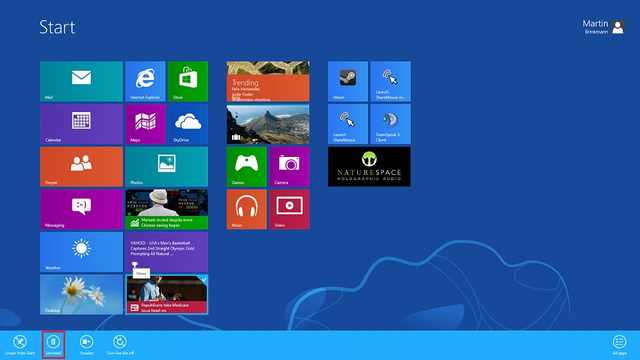
13. Easily uninstall an app: hover over the app tile, right click with the mouse and select “Uninstall” – done! If you have a touchscreen, tap and hold the app tile, drag it down a little and the option to uninstall will appear. |
 |
| 14. Go back to the classic Windows look: Download a program called “Classic Shell” from their site, HERE (http://www.classicshell.net/). It’s free and safe to use. |
 |
| 15. Run 2 Programs, side by side: Launch a program, then hold the “Windows” key and press “.” (Period) – This will pin the program to the right side of the screen. (Doing it again will move it to the left side, and a third time will make it full-screen) Now that it’s pinned, simply launch another program and it will fill the remaining space. |
 |
Source:::::ba-ba mail site
Natarajan
Joke of the Day… ” Why Does it work …” !!!
The science graduate asks, “Why does it work?” The engineering graduate asks, “How does it work?” The accounting graduate asks, “How much does it cost?” The liberal arts graduate asks, “Would you like fries with that?”
Source:::Joke of the Day…
Natarajan
” In-Town Check-in” For Flights at Hong Kong Airport !!!
The two basic options for traveling to a major metro airport with lots of luggage are bad and worse. You can go by car, which comes with the stress of beating traffic against a ticking clock and the heavy cost of parking fees, cab fares, or inconveniencing friends. Or, in some places, you can travel by transit or train, which comes with the uncomfortable and often physically demanding task of maneuvering bags through turnstiles, up and down stairs, and in between crowds of fellow riders.
Hong Kong would like you to know there’s a better way. A much, much better way.
It’s called “in-town check-in,” and it’s part of Hong Kong’s wonderful (and financially genius) MTR subway system. MTR has a special line dedicated to airport travel called the Airport Express (below, in teal).

As you’d expect with a name like in-town check-in, Airport Express travelers can check their luggage in town then proceed to the airport bag-free, or spend the day in the city, or do whatever travelers who aren’t carrying bags like to do.

The service is even better than that brief description suggests. Say, for instance, you have a 4 p.m. flight and have to leave your hotel by noon. That’s a very common problem that typically requires keeping a bag at THE HOTEL all day and coming back to get it before heading to the airport. Not the ideal scenario.
With in-town check-in, you could take a 10 a.m. shuttle to one of the two Airport Express stations with check-in service (Hong Kong or Kowloon), drop off your bags and get your boarding pass (the service is essentially a satellite version of a typical airline counter), then spend the next several hours touring the city or taking a meeting. Some airlines allow in-town check-in up to a full day in advance, so there’s no intricate time-management required. There are even bag porters at the Hong Kong and Kowloon stations.
Here’s the best part: The next time you see your bag is when you land. It’s not like you pick up the bag at Hong Kong airport and do the whole thing again—the bag checks all the way through to your final destination. When you do finally arrive at the Hong Kong airport, you just go straight to security.
One of the many beauties of this system is that travelers who drop off their bags at Hong Kong or Kowloon stations find themselves right on the MTR. That makes it easy to hop around town without losing a half day to airport travel (in the case of Hong Kong Station, you’re right in the central business district anyway).
Here’s what the entire process looks like:


The one catch, if you insist on finding one, is that you need an Airport Express ticket to use the check-in service. But you’ll probably want one of those anyway: the ticket costs about $100 Hong Kong ($13 U.S.), while taking a cab to the airport can cost several times as much. Oh, and the Airport Express train has WiFi.
So this is pretty brilliant. And it’s not just good for travelers—it’s great for the city, too, keeping cars off the road and generating revenue for the transit system.
Source::::: Business Insider
Natarajan
 Take off with Natarajan